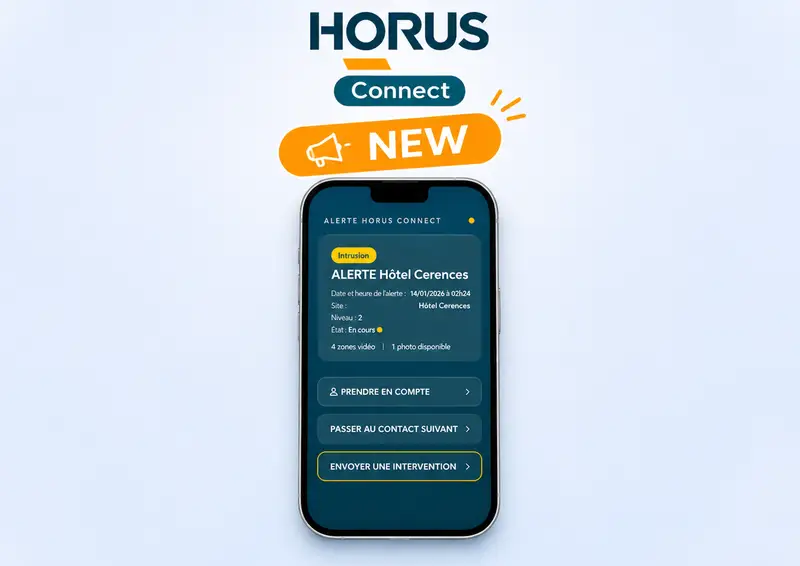
In an alarm monitoring center, some alarms could be resolved by the client, who is better placed to judge the context. Yet they still take up operators’ time and generate communication costs. Azursoft is launching Horus Connect, a new feature of its Horus monitoring center software: site contacts respond to certain alarms from their smartphone, following the rules set by the center.
Simple alarms that tie up operators
When a site’s alarm panel sends an alarm, the center follows a precise handling scenario. It calls the designated contacts, collects their answer, enters it into the system and decides on the next step.
Yet some situations can be settled directly by the client, such as a system someone forgot to arm. These alarms keep operators busy and incur communication costs, without always requiring their intervention.
The aim is not to shift the center’s responsibility onto the client. It is to keep the teams’ time for the events that call for their vigilance and expertise.
How Horus Connect works
- A smartphone notification: when the site’s alarm system is triggered, the contact is notified according to the scenario set by the center.
- An answer from predefined options: the contact opens the alarm and selects an answer from the options configured by the center.
- Password confirmation: the contact confirms the choice before sending it.
- Logged execution: Horus carries out the answer as if an operator had entered it, and records it in the event log.
The center stays in control at every step
- Rules: the center defines the scenarios, chooses which contacts to notify, sets the possible answers and the response times.
- Traceability: notifications sent, received and displayed, as well as answers, are all logged.
- Fallback to operators: if there is no answer within the set time, the alarm automatically returns to the operators, following the usual procedure.
- Less SMS: text messages are only used as a last resort.
A secure app that is easy to roll out
- Android and iPhone: the app runs on both systems.
- Branded by the center: each monitoring center can customize it and offer it to its clients as an extension of its alarm monitoring services.
- No app store: access is by invitation, with a QR code or a link.
- Discreet notifications: on a locked screen, they reveal neither the location nor the type of alarm.
- Duress code: it lets the contact discreetly alert the center to a situation.
Monitoring centers are not short of alarms: they are short of time for the ones that matter. With Horus Connect, we give site contacts the ability to handle simple situations, while the center keeps control of the rules, the traceability of exchanges and the decision to intervene. The goal is to reduce repetitive tasks so that operators can focus on the alarms that require their expertise.
Olivier Riquet, CEO of Azursoft

Want to know more?
Your Questions About Horus Connect
No. The site contact only responds to the alarms, and with the answers, set by the center. If there is no answer in time, the alarm returns to the operators following the usual procedure.
Through an invitation sent by the center, as a QR code or a link. No download from an app store is needed.
Yes. Notifications sent, received and displayed, as well as answers, are logged, and the selected answer is recorded in the Horus event log.
The notification shows neither the location nor the type of alarm.